

The BioRender Alternative That Generates & Edits Figures by Chat
Describe your mechanism, workflow, or research idea. SFG turns it into a visual draft you can refine by chat—so you can explore your figure before spending on a subscription.
No credit card needed. Verify your account for 5 free figures (50 credits over two days); downloads are included.
Scientific figure generator
Try it with your own research
Send this pathway or describe your own figure. The result opens on a canvas where you mark any detail and say what to change.
5 free figures for new accounts, no card. Downloads have no watermark.
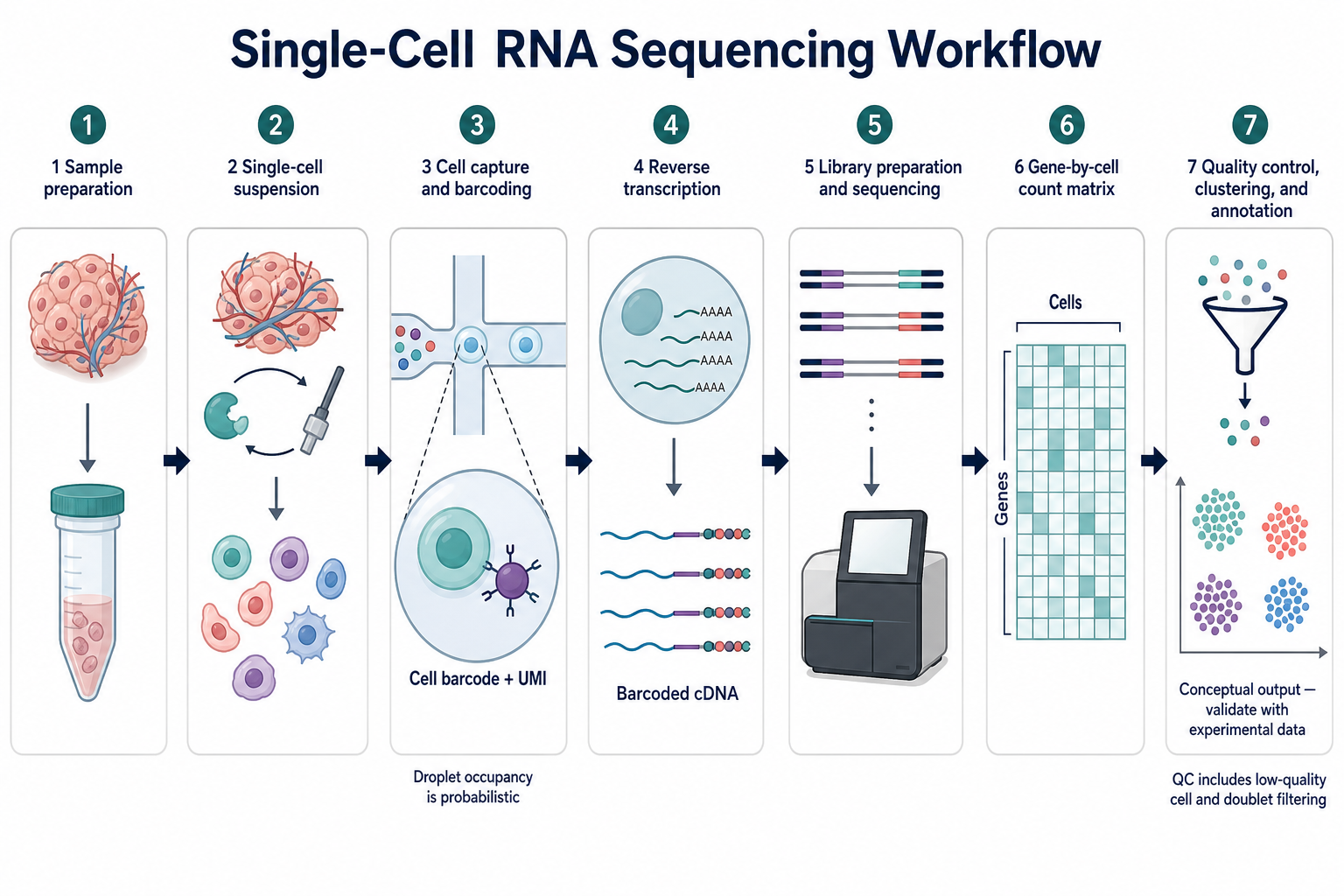
Why choose SFG as your BioRender alternative?
A mechanism for your lab meeting. A workflow for a presentation. A visual summary of your next paper. If you need a useful figure without committing to a full illustration subscription, start with a tool you can try on your own research. The cost question already comes up in research communities:
“I only use it like 3 times a month.”
“the PI is complaining about the cost again.”
Individual comments from public discussions, not SFG customer testimonials. Read the linked threads for the full context.
Start with signup credits
Verify a new account for 5 free figures, then explore prompts and revisions with one balance. Downloads are included. Basic is $9.90/month with 200 credits for ongoing work.
Start with your science, not a blank canvas
You know the mechanism you want to explain. Describe its components, relationships, labels, and layout, and let SFG create the first visual draft. Or open a scientific template and adapt it. You have something concrete to review before you start fine-tuning the details.
Find the look that explains your idea
Try Line Art for a restrained diagram, Flat Illustration for a conceptual overview, or 3D Render for a spatial explanation. Compare directions while previewing, then carry your chosen style into the next revision. Your figure should help your audience understand the story you are telling.
Ask for a change without losing your starting point
On desktop, circle a region and ask for a clearer label, a different arrow, or more space between panels. Each edit creates a connected version. Compare it with the original, choose your preferred direction, and continue from there.
Circle. Describe. Refine.
A label is too vague. An arrow points the wrong way. A panel needs more room. Circle the area and say what should change. See how the original and the revised figure sit together, so each decision is easier to review. Try the label, arrow, and layout examples below, then bring your own brief to the generator.
Refine the details that matter.
Labels, arrows, layout. Tell AI what to change—and keep refining until it works for you.
Give every label the right meaning.
Replace shorthand with precise terminology, without rebuilding your figure.
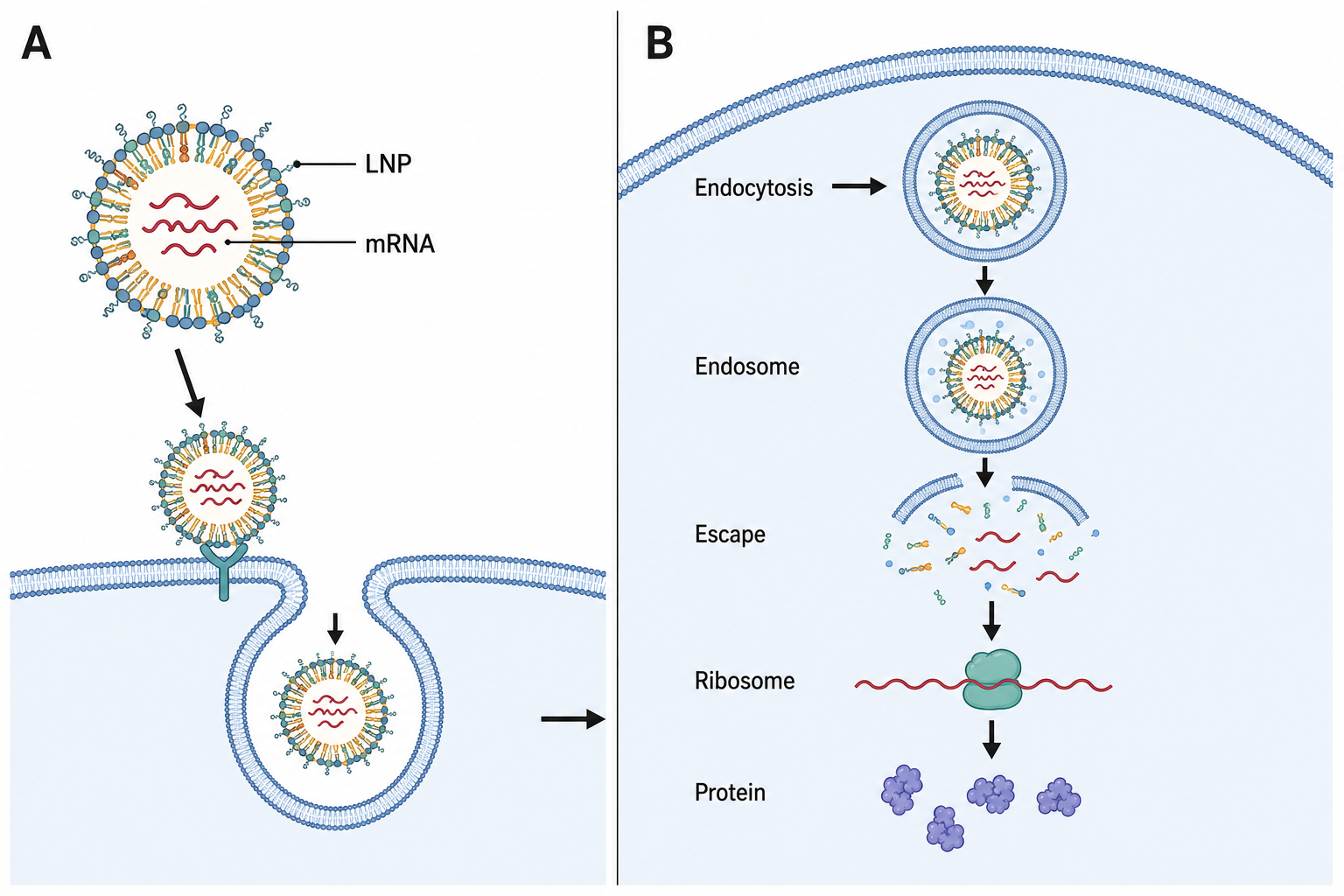
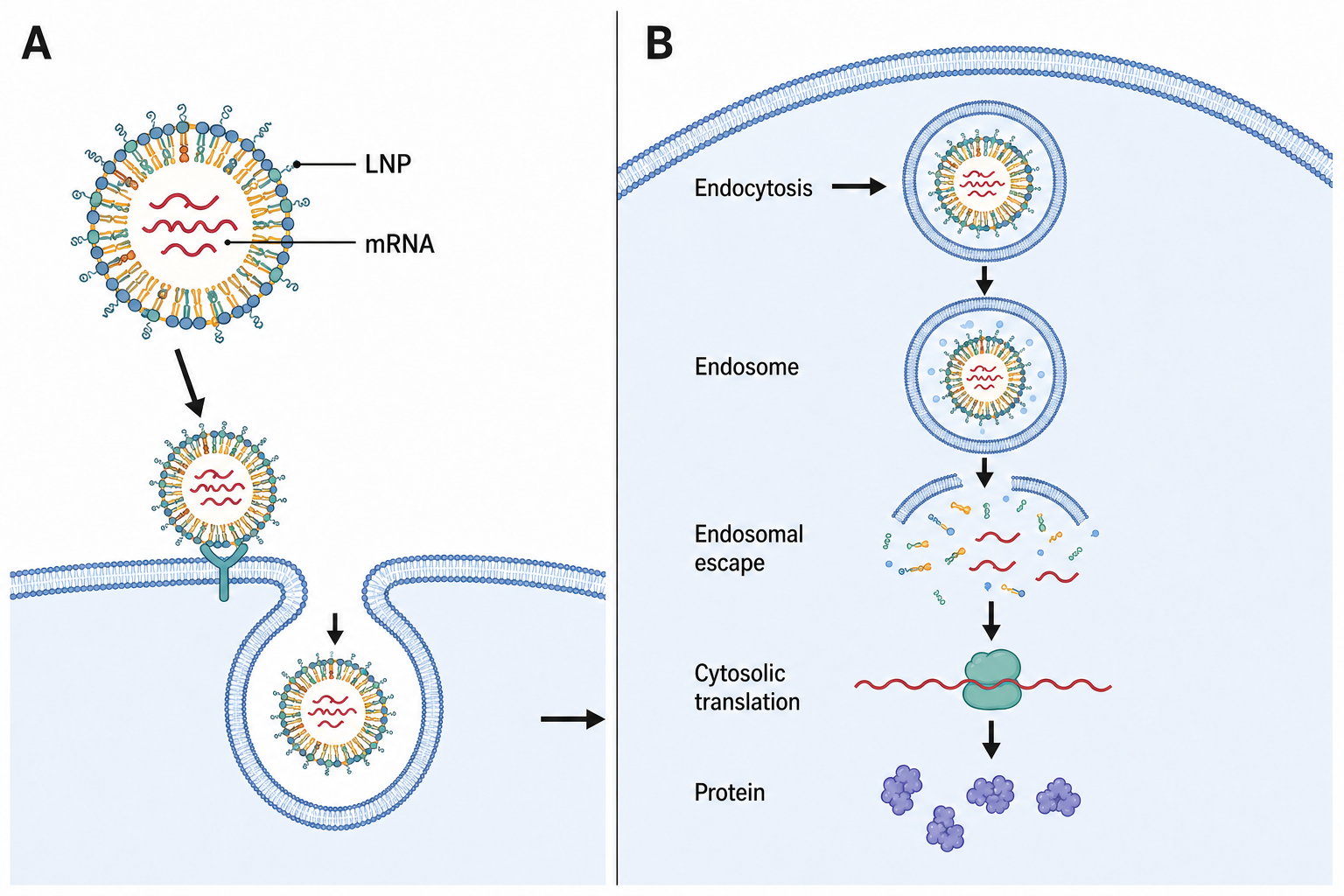
Change “Escape” to “Endosomal escape” and “Ribosome” to “Cytosolic translation”.
Example instruction: Change “Escape” to “Endosomal escape” and “Ribosome” to “Cytosolic translation”.More precise labels. The same scientific illustration.
Illustrative edit · Simulated playbackDescribe Generate Refine Download
Create a diagram for your paper with our scientific figure maker.
Example images illustrate editing possibilities. Results vary; review scientific accuracy before use.BioRender vs Scientific Figure Generator: feature comparison
SFG is a focused choice for getting an illustration draft from your research and refining it by conversation. BioRender offers a broader asset-based workspace and also supports AI generation and editing. Here is what each approach gives you.
Scroll the table sideways to compare both tools.
| Decision point | Scientific Figure Generator | BioRender |
|---|---|---|
| Generation & editing | Describe your research, generate a figure, then mark a region and request an edit on desktop. Each edit creates a connected image version. | AI generation from text or references, editable elements, and prompt-based changes to icons or figure elements. Source ↗ |
| Starting point | Start with a research brief or an SFG template. New verified accounts receive 5 free figures: 3 at signup, 2 more the next day. | Combine icons and templates, use scientific drawing tools, or start from an AI-generated draft. Source ↗ |
| Version management | Compare the original and connected edits on the canvas. Save selected figures to your account; guest previews are temporary. | Version History lets you recover an earlier illustration by making a copy from the canvas or gallery. Source ↗ |
| Icons & templates | A curated starting-template collection and generated illustrations in Line Art, 3D Render, and Flat Illustration styles. | Its features page lists 50,000+ icons and 5,000+ templates, plus specialized drawing and protein-structure tools. Source ↗ |
| Export & control | PNG output. Paid models offer resolution choices; generated text and shapes are not separately editable SVG objects. | JPEG, PNG, and PDF exports, with direct control over figure elements in its editor. Source ↗ |
| Free access | New verified accounts receive 5 free figures: 3 at signup, 2 more the next day. Successful 1K generations and edits use 10 credits; 2K results use 20 credits. Downloads are included. | Free plan: three figures, AI credits, and no publication or commercial use. Source ↗ |
| Best fit | Researchers exploring visual directions who prefer writing a brief and reviewing image variations. Accuracy and final layout still need human review. | Scientists needing detailed component control, reusable scientific assets, or an established lab illustration workflow. Source ↗ |
BioRender pricing and SFG payment options
Start with 5 free signup figures. Then choose Basic at $9.90/month for 200 credits. BioRender Academic Individual is $39 on monthly billing. Pick the commitment that matches how often you create figures.
USD prices checked September 6, 2026. Annual equivalents require an annual payment. Plans have different allowances; account eligibility, add-ons, and applicable taxes can change the amount you pay.
BioRender
| Plan | Monthly billing | Annual billing |
|---|---|---|
| Free | $0 | $0 |
| Academic Individual | $39 | $420/year ($35/mo) |
| Academic Lab · 5 seats | $129 | $1,188/year ($99/mo) |
| Industry Individual | $115 | $1,140/year ($95/mo) |
Academic AI add-ons start at $5/month billed annually; Industry AI add-ons start at $25/month billed annually. These are separate from base plans. View current BioRender pricing.
Student pricing appears after eligibility checks in your account. The student plan is for individuals paying out of pocket; reimbursed subscriptions require an appropriate individual or lab plan. See student eligibility.
Scientific Figure Generator
- Signup credits · 50
- Use any model for generation or editing. Successful 1K results use 10 credits and 2K results use 20.
- Basic · $9.90/month
- 200 credits each month. Annual billing is $83.16/year, also with monthly credit grants. Generation and saved-asset editing costs depend on model and resolution.
When BioRender is still the better choice
You need component-level control
Choose an illustration editor when each symbol, connector, and label needs individual adjustment. BioRender’s scientific asset library and drawing tools are a substantial strength. An SFG-generated PNG is a different kind of deliverable.
Your lab already works there
If colleagues maintain reusable figures in BioRender or your institution covers access, switching can add work instead of saving money. Test a supplementary SFG workflow for new illustration drafts before replacing a shared process.
Your project specifies the workflow
Follow a supervisor’s required file workflow and your journal’s figure rules. Manual asset assembly and AI-generated illustration can face different requirements. Check those constraints before spending time polishing either draft.
BioRender alternative FAQs
Is Scientific Figure Generator a free BioRender alternative?
New verified accounts receive 5 free figures (3 at signup, 2 the next day) for exploring and refining figures. Successful 1K generations and edits use 10 credits, successful 2K results use 20 credits, and downloads are included.
How much does BioRender cost compared with SFG?
As checked September 6, 2026, BioRender Academic Individual is $39 month-to-month or $420 billed annually. SFG Basic is $9.90 billed monthly with 200 credits per month. These cover different workflows and allowances; compare the pricing table and current checkout details before choosing.
Is SFG a good option for students on a budget?
It can suit occasional illustration work because new verified accounts receive 5 free figures and downloads are included with successful results. Also check whether your institution already pays for BioRender. Its student discount is account-specific and subject to eligibility, so compare your actual offer.
How is circle & chat different from BioRender’s editor?
In SFG’s desktop preview editor, mark the area to change and describe the revision. The result is a new connected image, rather than separately editable vector components. BioRender also offers AI prompts and editable figure elements. Choose by the editing control you need, not simply whether a tool has AI.
Do you keep my original figure when I edit it?
Yes. An edit creates another version instead of overwriting the original on your canvas. Compare them side by side and continue from the version you prefer. Guest previews are temporary; save selected figures to your account and download the results you want to keep.
Can I export figures for a journal?
SFG offers clean PNG downloads and paid higher-resolution options. Before submitting, review dimensions, labels, scientific accuracy, and your journal’s AI and disclosure rules. Journal acceptance is not guaranteed, and an exported PNG is not an editable SVG or layered illustration file. Check the entire image after an AI edit, including details outside the marked area.
Does a subscription include unlimited paid edits?
No. Basic includes 200 credits per month. Each successful 1K generation or edit consumes 10 credits and each 2K result consumes 20 credits. Every result includes its download.
When should I stay with BioRender?
Keep BioRender if its icon library, element-level editing, lab workflow, or existing institutional access is central to your work. SFG is worth trying when you want to explore generated illustration drafts and conversational revisions. Test the same small, representative task in each tool before moving an established workflow.
For the related source details, see BioRender pricing, BioRender AI tools, our terms, and our AI figure citation guide.
Sources and disclosure
Written by the Scientific Figure Generator team, using our current product configuration and BioRender’s linked public documentation. The recommendations are our assessment of workflow fit, not independent test scores. Reddit excerpts describe individual needs, not verified performance. BioRender is a trademark of its owner; SFG is not affiliated with or endorsed by BioRender.
Comparing another AI figure workspace? Read our Scientific Figure Generator vs FigureLabs comparison.
Bring your research. See your first figure.
Start with the mechanism, workflow, or idea you are working on today. Verify a new account for 5 free figures, generate a figure, then circle one detail and try a revision.